March 8, 2016

code shortcut


 ClassA x = new ClassA();
ClassA x  ie x is variable of Class A

New ClassA()
This constructor does nothing except set the memory to its default values. The default constructor is public.

http://anil-businessanalyst.weebly.com/domain-knowledge.html

call method

DataTable dtCustomer= new ClsCustomerDAL().LoadCustomers();


using System;
public class Animal
{
    public Animal()
    {
        Console.WriteLine("Animal called");
    }
    public virtual void method()
    {
        Console.WriteLine("common method called from animal");
    }
}
public class Bird : Animal
{
    public Bird()
    {
        Console.WriteLine("Bird called");
    }
    public new void method()
    {
        Console.WriteLine("special method called from bird");
    }
    public void method1()
    {
        Console.WriteLine("BM1");
    }
}

class Program
{
    static void Main(string[] args)
    {
        //Animal obj = new Bird();// what is use of it?
        new Bird().method();
        //obj.method();
        Console.Read();
    }
}


public class Overload
    {
        public void Display()
        {
            int[] numbers = {10, 20, 30};
            DisplayOverload(40, numbers);
            Console.WriteLine(numbers[1]);
        }

        private void DisplayOverload(int a, params int[] parameterArray)
        {
            parameterArray[1] = 1000;
        }

    }
class Program
    {
        static void Main(string[] args)
        {
            Overload overload = new Overload();
            overload.Display();
            Console.ReadKey();
        }
    }
Output
1000

February 6, 2016

invalid postback or callback argument. Event validation is enabled using in configuration or <%@ Page EnableEventValidation="true" %> in a page. For security purposes, this feature verifies that arguments to postback or callback events originate from the server control that originally rendered them. If the data is valid and expected, use the ClientScriptManager.RegisterForEventValidation method in order to register the postback or callback data for validation.

Reason: There are multiple scenario in which this error come.


if we try to change the property of asp.net control through the Javascript after page load then above issue comes.

This error might be coming from one of the user control present on the page
(Search or header)

Or

forgot to add an ID to a dynamically created control.

Or
check design contain two nested <form></form> tag

Or
other......

Solution:

Remove two nested <form></form> tag

OR
<pages validateRequest="false" enableEventValidation="false" />
and do Toolscriptmanager partial rendering is enabled

OR
IsPostBack in page load

OR
Use update panel which attribute is changing due to javascript

OR
ScriptManager scriptManager = ScriptManager.GetCurrent(this.Page);
scriptManager.RegisterPostBackControl(buton1);

OR
Other...........

February 1, 2016

Base Class In asp.net

content copied .....

The class whose members are inherited is called the base class, and the class that inherits those members is called the derived class. A derived class can have only one direct base class. However, inheritance is transitive. If ClassC is derived from ClassB, and ClassB is derived from ClassA, ClassC inherits the members declared in ClassB and ClassA.

When you derive a class from a base class, the derived class will inherit all members of the base class except constructors. The Derived class re-use the code of base class based on accessibility level of those member.


Example Of Base Class :

public class Clsbase : System.Web.UI.Page
{  
    protected override void OnLoad(EventArgs e)
    {       
        Response.Write("From base class");
        base.OnLoad(e);
    }  
}


Example Of Derived Class :

public partial class ClsDerived : Clsbase

    protected void Page_Load(object sender, EventArgs e)
    {
        Response.Write("From Derived Class");    
    }
}

January 29, 2016

Layered architecture

  • Help reduce complexity and improve code reusability
  • It is often thought that this automatically creates a decoupled application. However, just creating layers doesn’t make your code loosely coupled.
  • Avoid Too Many Parameters 
  • Declare a class instead of too many parameters.
  • Creating a class that puts all these parameters together. This is generally a better design and valuable abstraction.
  • Avoid Complex Expressions
  • Minimize the Number of Returns
  • Use Parameterize queries instead of inline query

January 27, 2016

Entity Framework

The NuGet Gallery is the central package repository used by all package authors and consumers.


module is a set of functions, types, classes, ... put together in a common namespace.
library is a set of modules which makes sense to be together and that can be used in a program or another library.
package is a unit of distribution that can contain a library or an executable or both. It's a way to share your code with the community.
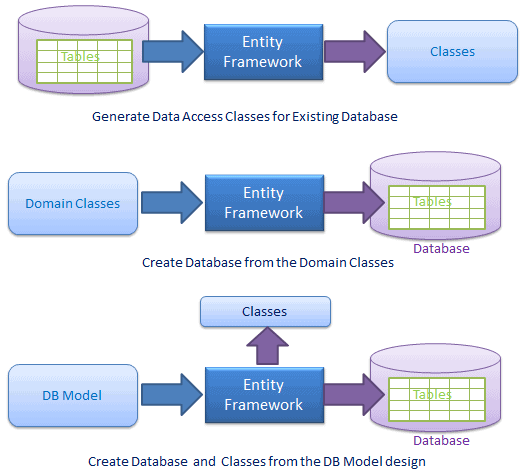
Entity Framework is ORM (Object relational mapper)

Entity Framework overview


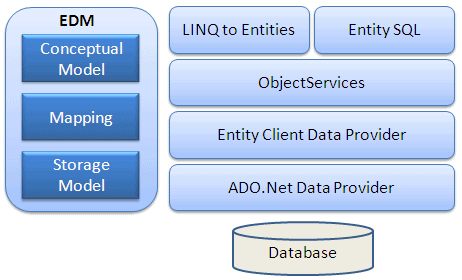
Entity Framework Architecture

  • Extension of EF is .edmx
  • EF is directly talk with database. DAL is not required .
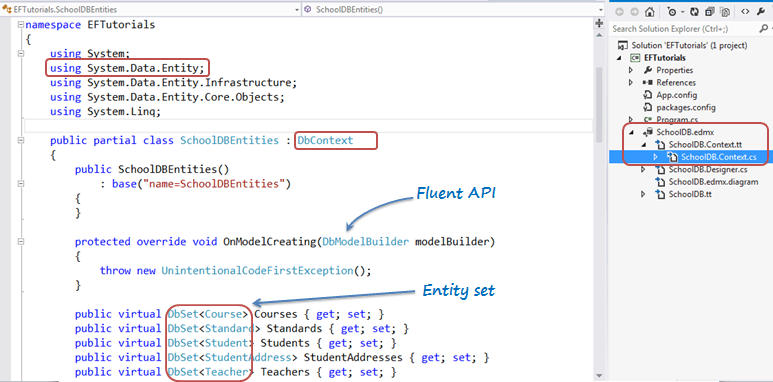
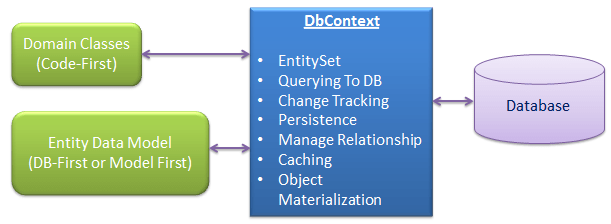
  • EF use ObjectContext =>DbContext interfacing with database
  • EF use EDM concept that describe the structure of data

https://msdn.microsoft.com/en-us/library/ee382825(v=vs.110).aspx


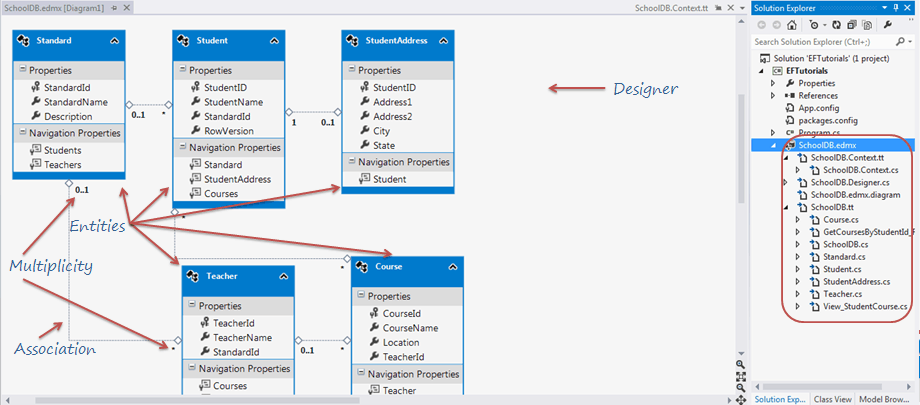
  • Entity type is class. it generate from table structure.
  • Entity type contain property and method where property is column of table and method is operation (Select/Insert/Update/Delete) done on that table
  • EF can do the operation on table with the help of LINQ or  store procedure
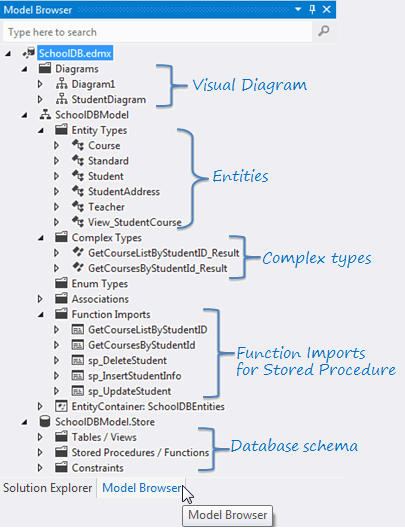
  • Complex object is created via Model browser if we have to call store procedure
  • Model browser - show the edmx file Model browser tab

EDM contain
  • CSDL- conceptual schema definition language
  • SSDL- storage schema definition language
  • Table Mapping - conceptual mapping and storage mapping
  • Schema contain multiple entity containers.
  • Entity container is namespace and contain entity type
  • EntityType (NavigationProperty,Scalar Property(facet),EntityKey).
  • Property contain facet (other information related to that column like Not NULL, Max length)
  • Validate - check CSDL or SSDL are synch or not
  • Complex Property
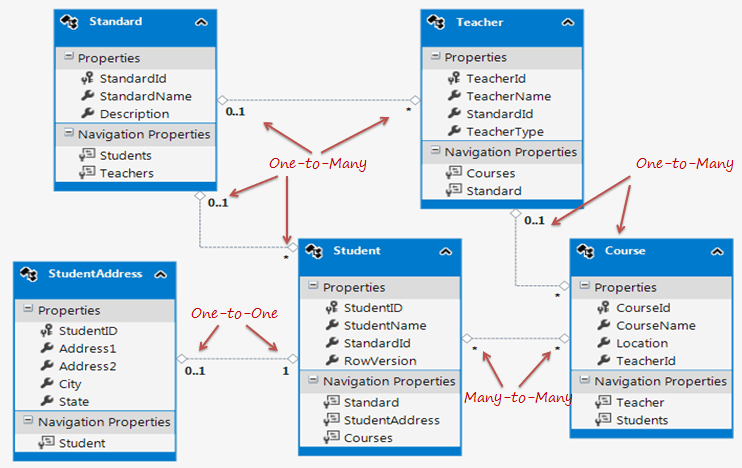
  • association - create relation between entity types

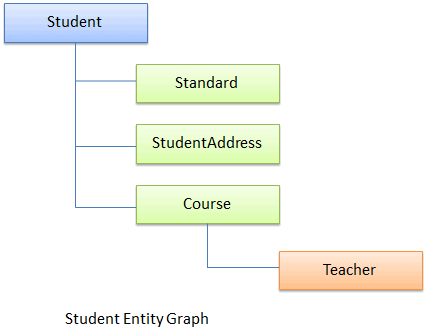
The relationship between an entity type and an entity set is analogous to the relationship between a row and a table in a relational database: Like a row, an entity type describes data structure, and, like a table, an entity set contains instances of a given structure.

Entity Framework Architecture

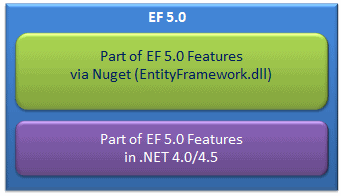
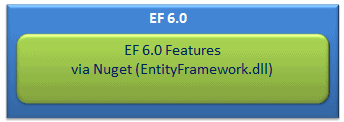
Setup Entity Framework Environment:


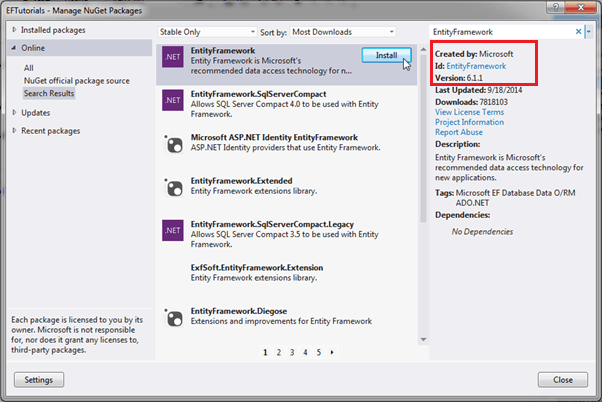
Entity Framework5


Entity Framework6


Install EF via Nuget:

Entity Framework install

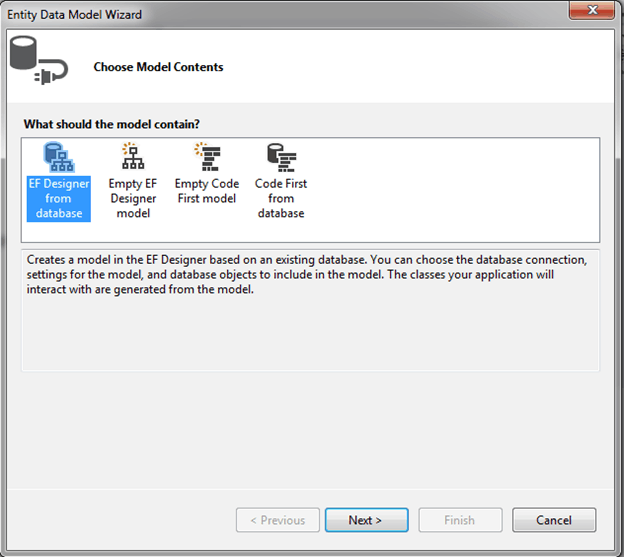
Create Entity Data Model:


Entity Framework 5.0 Tutorial

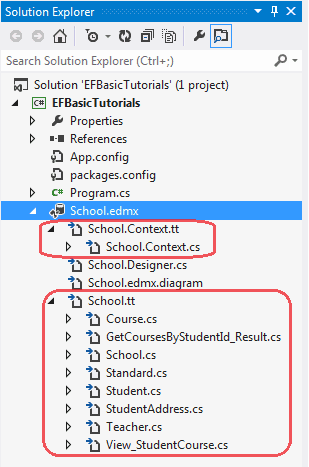
Context & Entity Classes:

Entity Framework 5.0 Tutorial

Model Browser
Entity Framework 5.0 Tutorial

DBContext:

Entity Framework 5.0 Tutorial


Types of Entity in Entity Framework:

  • POCO Entity (Plain Old CLR Object):
  • Dynamic Proxy (POCO Proxy):


Entity Framework dbcontext


Entity Relationships:


Entity relationships in entity framework


entity relationships in entity framework


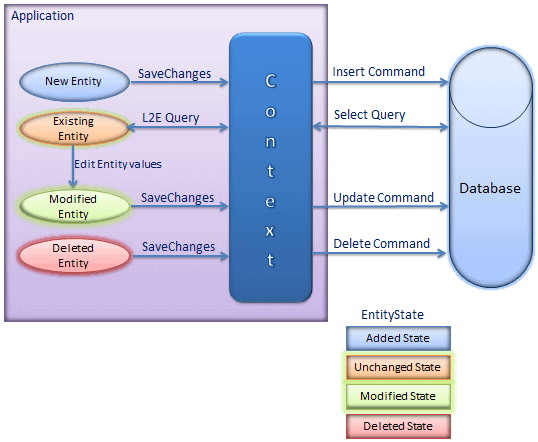
Entity Lifecycle:


entity states in Entity


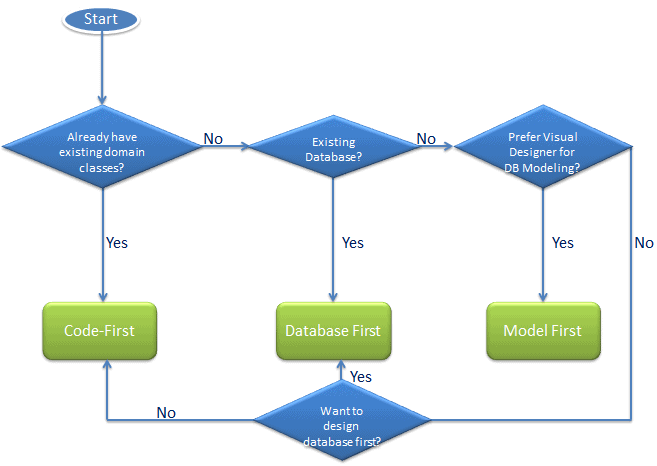
Choose Entity Framework modling


can execute native SQL queries for a relational database

using (var ctx = new SchoolDBEntities())
{
    var studentName = ctx.Students.SqlQuery("Select studentid, studentname, standardId from Student where studentname='Bill'").FirstOrDefault<Student>();
}    

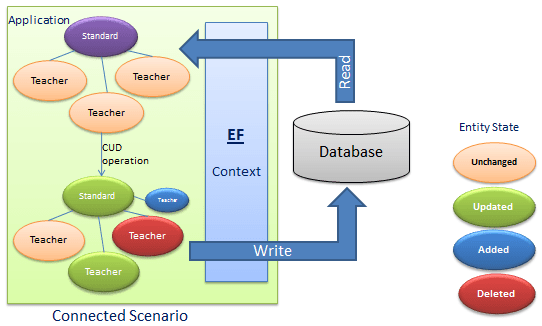
Maintain change track


Connected scenario

Entity Framework tutorial 4.3 dbcontext


using (var context = new SchoolDBEntities())
{
    var studentList = context.Students.ToList<Student>();

    //Perform create operation
    context.Students.Add(new Student() { StudentName = "New Student" });

    //Perform Update operation
    Student studentToUpdate = studentList.Where(s => s.StudentName == "student1").FirstOrDefault<Student>();
    studentToUpdate.StudentName = "Edited student1";

    //Perform delete operation
    context.Students.Remove(studentList.ElementAt<Student>(0));

    //Execute Inser, Update & Delete queries in the database
    context.SaveChanges();
} 

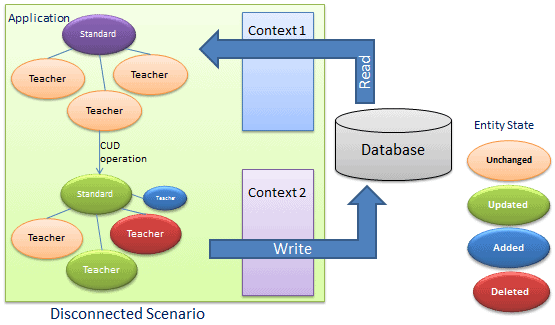
Disconnected scenario


using (var context = new SchoolDBEntities())
{
    var studentList = context.Students.ToList<Student>();

    //Add student in list
    studentList.Add(new Student() { StudentName = "New Student" });

    //Perform update operation
    Student studentToUpdate = studentList.Where(s => s.StudentName == "Student1").FirstOrDefault<Student>();
    studentToUpdate.StudentName = "Edited student1";

    //Delete student from list
    if (studentList.Count > 0)
        studentList.Remove(studentList.ElementAt<Student>(0));

    //SaveChanges will only do update operation not add and delete
    context.SaveChanges();
}

There are two ways to go with code first approach:
  1. Data annotation
  2. Fluent API

Code First Approach using Data Annotation

Create one .cs file and give name person.cs and paste the below code into it. As this his data annotation approaches, don’t forget to add System.ComponentModel.DataAnnotation namespace.
using System;
using System.Collections.Generic;
using System.ComponentModel.DataAnnotations;
using System.ComponentModel.DataAnnotations.Schema;
using System.Data.Entity;
using System.Linq;
using System.Text;
using System.Threading.Tasks;

namespace ConsoleApp
{
    public class Person
    {
        [Key]
        public int Id{get;set;}
        [Required]
        public string name { get; set; }
        [Required]
        public string surname { get; set; }
    }

    public class Address
    {
        [Key]
        public int personAdressId { get; set; }
        public string address { get; set; }

        [MaxLength(6)]
        public string pin { get; set; }

        [ForeignKey("Person")]
        public int PersonId { get; set; }

        //Navigation property
        public virtual Person Person { get; set; }
    }

    public class personContext : DbContext
    {
        public personContext() : base("DBConnectionString")
        {
            //If model change, It will re-create new database.
            Database.SetInitializer<personContext>(new DropCreateDatabaseIfModelChanges<personContext>());
        }
        public DbSet<Person> person { get; set; }
        public DbSet<Address> Address { get; set; }
    }
}
we will specify connection string in web.config file in application. Here is code for mine.
<connectionStrings>
    <add name="DBConnectionString" 
        connectionString="Data Source=SOURAV-PC;Initial Catalog=personDB;Integrated Security=true" 
        providerName="System.Data.SqlClient"/>
  </connectionStrings>


We will implement the same model to create database using fluent API. Have a look at the below modified code of person.cs file.


using System;
using System.Collections.Generic;
using System.ComponentModel.DataAnnotations;
using System.ComponentModel.DataAnnotations.Schema;
using System.Data.Entity;
using System.Linq;
using System.Text;
using System.Threading.Tasks;

namespace ConsoleApp
{
    public class Person
    {
        public int Id{get;set;}
        public string name { get; set; }
        public string surname { get; set; }
    }

    public class Address
    {
        public int personAdressId { get; set; }
        public string address { get; set; }
        public string pin { get; set; }
        public int PersonId { get; set; }
        public virtual Person Person { get; set; }
    }

    public class personContext : DbContext
    {
        public personContext()
            : base("DBConnectionString")
        {
            //If model change, It will re-create new database.
            Database.SetInitializer<personContext>(new DropCreateDatabaseIfModelChanges<personContext>());
        }
        protected override void OnModelCreating(DbModelBuilder modelBuilder)
        {
            //Set primary key to Person table
            modelBuilder.Entity<Person>().HasKey(m => m.Id).Property(m => m.Id).IsRequired();
            //name fleld is required

            modelBuilder.Entity<Person>().Property(p => p.name).IsRequired();
            //surname is required
            modelBuilder.Entity<Person>().Property(p => p.surname).IsRequired();

            //set primary key to Address table
            modelBuilder.Entity<Address>().HasKey(m => m.personAdressId);

            //set max length property to 6 
            modelBuilder.Entity<Address>().Property(m => m.pin).HasMaxLength(6);

            //Set foreign key property
            modelBuilder.Entity<Address>().HasRequired(t => t.Person)
                .WithMany().HasForeignKey(t => t.PersonId);
        }
        public DbSet<Person> person { get; set; }
        public DbSet<Address> Address { get; set; }
    }
}

September 17, 2015

Software categories

Computer software
  1. Application Software
  2. System software
  3. computer programming tool
  4. Mobile software & Apps

Application software

https://en.wikipedia.org/wiki/List_of_software_categories

https://en.wikipedia.org/wiki/Enterprise_software


Supply chain management (SCM) is the management of the flow of goods and services.It includes the movement and storage of raw materials, work-in-process inventory, and finished goods from point of origin to point of consumption


Enterprise resource planning (ERP) is business management software—typically a suite of integrated applications—that a company can use to collect, store, manage and interpret data from many business activities, including:


Enterprise asset management (EAM) is the optimal lifecycle management of the physical assets of an organization

Customer relationship management (CRM) is an approach to managing a company’s interaction with current and future customers. It often involves using technology to organize, automate, and synchronize salesmarketingcustomer service, and technical support.

content management system (CMS) is a computer application that allows publishingediting and modifying content, organizing, deleting as well as maintenance from a central interface. Such systems of content management provide procedures to manage workflow in a collaborative environment.
DotNetNuke
Umbraco

Business process management (BPM) is a field in operations management that focuses on improving corporate performance by managing and optimizing a company's business processes

Enterprise resource planning (ERP)
SAP(ERP)-it is ERP system.
supplier relation management(SRM)-procurement & logistics
cloud,
SMS,payment gateway,
e-commerce,
audit of software/
BI reports-Database analysis /power BI /spotfire/ tableau/ qlikview
highcharts

mobile apps

August 16, 2015

App_Code folder does not work with Web Application Projects.

If your application is a Web Application project rather than a Web Site project, the code files should not be in the App_Code folder (stupid design).

Solution:
1)Build Action of class.cs to be changed from "Content" to "Compile".

2)Create a new folder or something and put class files in there.

April 18, 2015

increase performance of visual studio 2012

Goto Tools>Options>Environment>Add In Security
You will see a checkbox with “allow add in components to load” .Just uncheck it. Restart the IDE and check the lightning speed of the IDE now


https://www.youtube.com/watch?v=XFdBpNc2oaM

try “Tools”-”Options”-”Enviroments and Updates” and disable “Automatically Check for Updates. 
Tools > Options -- CHECK "Show all options"
  • IntelliTrace -- DISABLE
  • HTML Designer -- DISABLE
50% startup speedup
Tools > Options
  • Environment > Add-in/Macros Security -- UNCHECK "Allow Add-in components to load"
Tools > Extension Manager
  • Uninstall all you don't need.
Tools > Options > Environment >
  • Uncheck "Automatically adjust visual experience based on client performance"
  • then uncheck "Enable rich client visual experience".
Tools > Options > Environment > Startup:
  • At startup = "Show empty environment"
Tools > Options > Source Control
  • Set to "None"
Tools > Options > Environment >
  • Uncheck "Automatically adjust visual experience based on client performance"
  • then uncheck "Enable rich client visual experience".
Tools > Options > Environment > Startup:
  • At startup = "Show empty environment"
Tools > Options > Source Control
  • Set to "None"

The only way I know to improve the performance is to disable Edit & Continue option.. Tools -> Options -> Debugging -> Edit & Continue (uncheck the option)

Review a few magical settings (Most impact)

When an ASP.NET website is loaded for the first time, it pre-compiles all your pages and user controls. Once done, everything runs faster. This is great for production websites, but horrible for your development machine. Why?  When programming, you’re usually only modifying a page or two (or back-end code). You’ll iteratively make a change, compile, launch the website, test, and start over; often dozens of times. A two minute compile/load time (like we had) forces you to lose focus and get distracted. The following setting makes pre-compilation more selective, making the first load time massively faster in development scenarios. On my machine, it cut the first load time from around 74 seconds to 6 seconds.
<compilation ... batch="false"> ...</compilation>

Restart your IDE after these and you should observe a noticeable speed increase.


January 15, 2015

Asp.net server controls from scratch

we can then build reusable visual components for our web application’s user interface by creating our own controls.We can add this custom .dll in GAC and can share with other control too.We can create a custom control that inherits from another server-side control and then extend that control. We can also share a custom control among projects.

step to create project
1) create project -Asp.net server control -this is used to create dll

using System;
using System.Collections.Generic;
using System.ComponentModel;
using System.Linq;
using System.Text;
using System.Web;
using System.Web.UI;
using System.Web.UI.WebControls;

namespace ServerControl1
{
    [ToolboxData("<{0}:VideoPlayer runat=server></{0}:VideoPlayer>")]
    public class VideoPlayer: WebControl
    {
        private string _Mp4Url;
        public string Mp4Url
        {
            get { return _Mp4Url; }
            set { _Mp4Url = value; }
        }

        private string _OggUrl = null;
        public string OggUrl
        {
            get { return _OggUrl; }
            set { _OggUrl = value; }
        }

        private string _Poster = null;
        public string PosterUrl
        {
            get { return _Poster; }
            set { _Poster = value; }
        }

        private bool _AutoPlay = false;
        public bool AutoPlay
        {
            get { return _AutoPlay; }
            set { _AutoPlay = value; }
        }

        private bool _Controls = true;
        public bool DisplayControlButtons
        {
            get { return _Controls; }
            set { _Controls = value; }
        }

        private bool _Loop = false;
        public bool Loop
        {
            get { return _Loop; }
            set { _Loop = value; }
        }

        protected override void RenderContents(HtmlTextWriter output)
        {
            output.AddAttribute(HtmlTextWriterAttribute.Id, this.ID);
            output.AddAttribute(HtmlTextWriterAttribute.Width, this.Width.ToString());
            output.AddAttribute(HtmlTextWriterAttribute.Height, this.Height.ToString());

            if (DisplayControlButtons == true)
            {
                output.AddAttribute("controls", "controls");
            }

            if (PosterUrl != null)
            {
                output.AddAttribute("poster", PosterUrl);
            }

            if (AutoPlay == true)
            {
                output.AddAttribute("autoplay", "autoplay");
            }

            if (Loop == true)
            {
                output.AddAttribute("loop", "loop");
            }
            output.RenderBeginTag("video");
            if (OggUrl != null)
            {
                output.AddAttribute("src", OggUrl);
                output.AddAttribute("type", "video/ogg");
                output.RenderBeginTag("source");
                output.RenderEndTag();
            }

            if (Mp4Url != null)
            {
                output.AddAttribute("src", Mp4Url);
                output.AddAttribute("type", "video/mp4");
                output.RenderBeginTag("source");
                output.RenderEndTag();
            }
            output.RenderEndTag();
        }

        protected override void Render(HtmlTextWriter writer)
        {
            this.RenderContents(writer);
        }
       
    }
   
}
build it.it will create dll.add this dll in Toolbox and use in other project.

2) Next required any asp.net project to use this dll and show on page.

<%@ Page Language="VB" AutoEventWireup="false" CodeFile="Default.aspx.vb" Inherits="_Default" %>

<%@ Register Assembly="ServerControl1" Namespace="ServerControl1" TagPrefix="cc1" %>

<!DOCTYPE html>

<html xmlns="http://www.w3.org/1999/xhtml">
<head runat="server">
    <title></title>
</head>
<body>
    <form id="form1" runat="server">
    <div>
        <cc1:VideoPlayer ID="VideoPlayer1" runat="server" Mp4Url="http://techslides.com/demos/sample-videos/small.mp4" OggUrl="http://techslides.com/demos/sample-videos/small.ogv" Width="400" Height="400"  />
    </div>
    </form>
</body>
</html>

run on Google chrome browser.

November 27, 2014

Understand horrible database

I never got fresh database.it's my bad luck so I always deal with old database which are created by someone who already left the company.Due to this situation,I have wasted so much time while developing or finding bug.Today I got some tips on Google. Hopefully It will help me in future.

1) Create E-R diagram

2) Examine each table and column make sure the meaning of what it stores.

3) Examine each relationship and make sure how the tables relate to one another

or

1) Understand the project flow from front end code or any document

2) find master table and it's transaction table whose having same column ID name


First I look up for the "Master Table", then, with pen and paper, I start mapping the relations with other tables, after that, if there's some app code to look at I start making some raw sketches on how the data flows.See if the option of a Knowledge Transfer session is available to you, and if so, take full advantage of it.


--Find multiple table by using column name

SELECT * FROM ALL_TAB_COLUMNS 
 WHERE COLUMN_NAME LIKE '%TASK%' 
 AND owner = 'database_name';


--Find Column named like 'blah' in a specific table 

SELECT O.NAME, O.ID, C.NAME, O.XTYPE 
FROM SYSOBJECTS O LEFT JOIN SYSCOLUMNS C ON O.ID=C.ID 
WHERE C.NAME LIKE '%SearchFor%' 
AND O.XTYPE IN ('U','V') 
AND O.Name like '%TableName%' ORDER by O.Name


--Find all Columns in DB with name like 'blah' 

 SELECT O.NAME, O.ID, C.NAME, O.XTYPE 
FROM SYSOBJECTS O LEFT JOIN SYSCOLUMNS C ON O.ID=C.ID 
WHERE C.NAME LIKE '%SearchFor%' 
AND O.XTYPE IN ('U','V') ORDER by O.Name


select a.table_name, column_name,DATA_TYPE,DATA_LENGTH 
from all_tab_columns a,USER_ALL_TABLES u
where a.TABLE_NAME=u.TABLE_NAME
and column_name like ‘empid%’  order by DATA_LENGTH desc;

yes we can do a similar search in all views. Here is your query. 
Hope this helps you.. Let me know.


select a.table_name, column_name,DATA_TYPE,DATA_LENGTH 
from all_tab_columns a,ALL_CATALOG u
where a.TABLE_NAME=u.TABLE_NAME
and column_name like upper(‘latitude%’)
and u.table_type=’VIEW’
and u.owner=’YOUR_OWNER’
order by DATA_LENGTH desc;


Find child Table

SELECT table_name FROM ALL_CONSTRAINTS WHERE constraint_type = 'R' -- "Referential integrity" AND r_constraint_name IN ( SELECT constraint_name FROM ALL_CONSTRAINTS WHERE table_name = '[TableName]' AND constraint_type IN ('U', 'P') -- "Unique" or "Primary key" )


select table_name, constraint_name, status, owner from all_constraints where r_owner = :r_owner and constraint_type = 'R' and r_constraint_name in ( select constraint_name from all_constraints where constraint_type in ('P', 'U') and table_name = :r_table_name and owner = :r_owner ) order by table_name, constraint_name